

A flow transmitter that drifts overnight, a pressure signal that dips for a few seconds every afternoon, a newly installed dew-point transmitter that has to be proven before handover: most of the process signals in Pakistani plants still travel as 4-20 mA current loops, and many of the hardest faults are the ones nobody is watching when they happen. A small logger clipped into the loop for a day, a week or a month turns "it trips sometimes" into a timestamped trend that maintenance, instrumentation and process engineers can act on.
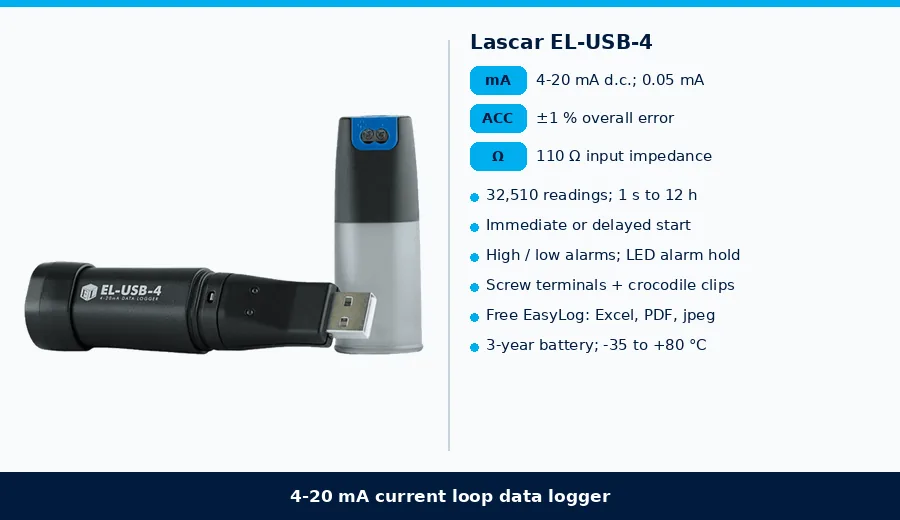
This note looks at the Lascar EL-USB-4 4-20 mA current loop data logger, a stand-alone USB logger that records loop current from transmitters, sensors and controllers. Figures come from the EL-USB-4 datasheet (Lascar, Issue 19 02/2021) hosted on our product page and from the current Tetracon product pages. Where we give general engineering advice or do simple arithmetic from the datasheet figures, it is labelled as general or as a calculation. No performance claim here goes beyond the manufacturer's published data.
Why log a 4-20 mA loop?
- Catch intermittent faults. A loop that drops out, spikes or freezes for a few seconds is easy to miss on a DCS screen and hard to reproduce with a handheld meter. The EL-USB-4 can sample as often as once per second and keeps over 32,000 readings (datasheet), so short events are captured with a date and time (general).
- Prove a new installation. Logging a transmitter's output during commissioning or a trial run gives a record that the signal was stable and in range before handover (general application).
- Trend a signal that is not yet connected. Where a transmitter has been installed but not yet wired to the control system, or a spare loop is being evaluated, the logger records it on its own; no PC needs to stay connected while it logs (datasheet operation; general).
- Settle arguments with data. Process, maintenance and vendor teams can look at the same exported trend in Excel or PDF (datasheet export formats; general practice).
How the EL-USB-4 works
The logger is a USB stick with a 4-20 mA cap on the end. The cap has a pair of screw terminals, and the logger is supplied with measurement leads ending in crocodile clips (datasheet). It measures loop current over the 4-20 mA d.c. range with an internal resolution of 0.05 mA d.c., an overall error of ±1 % and an input impedance of 110 Ω (datasheet).
Set-up and download use Lascar's free EasyLog USB software on Windows 7, 8 or 10 (32 or 64 bit). In the software you name the logger, choose a logging rate anywhere from 1 second to 12 hours, set high and low alarm thresholds and choose an immediate or delayed start. After the run, plug the logger back into the PC to graph, annotate and export the data to Excel, PDF or jpeg (datasheet).
The datasheet shows three ways to connect it: in series with a 4-20 mA loop transmitter, with a current-source sensor, and with a current-sink sensor. In every case the logger sits in the current path, so the loop current flows through its 110 Ω input (datasheet diagrams).
Status is shown by a green/red LED. A green flash means logging with no alarm; red single or double flashes mean a low or high alarm; slower flash patterns warn of a low battery, a delayed start or a full memory. With the alarm "Hold" option set in EasyLog, the LED keeps flashing red after the reading returns to normal, so a walk-past check shows whether a limit was crossed without downloading the data (datasheet).
EL-USB-4 at a glance
| Item | From the datasheet (Issue 19 02/2021) |
|---|---|
| Measurement range | 4 to 20 mA d.c. |
| Internal resolution | 0.05 mA d.c. |
| Accuracy (overall error) | ±1 % |
| Input impedance | 110 Ω |
| Memory | 32,510 readings |
| Logging rate | User selectable, 1 second to 12 hours; immediate or delayed start |
| Alarms | User-programmable high and low thresholds; red/green LED with optional alarm hold |
| Connection | 4-20 mA cap with two screw terminals; leads with crocodile clips |
| Battery | 3.6 V 1/2AA lithium metal; 3 years at 25 °C and a 2 second logging rate |
| Operating temperature | -35 to +80 °C |
| Dimensions | 98 x 26.8 x 26.8 mm |
| Software | EasyLog USB, free; Windows 7 / 8 / 10; export to Excel, PDF, jpeg |
| In the box | Battery, 4-20 mA range cap (USB-CAP-4-20), wall bracket, measurement leads |
Three quick calculations before you clip it in
- Loop voltage budget. At 20 mA the 110 Ω input drops 20 mA x 110 Ω = 2.2 V (calculation). Add that to the existing loop load and check it against the transmitter's limit. For example, our Michell Easidew PRO XP page lists a 2-wire 4-20 mA output with a maximum load of 250 Ω at 14 V or 500 Ω at 24 V, so on a 24 V loop there is room for the logger alongside a typical 250 Ω input card, while a loop already near its limit may not have room (product page; general).
- What the resolution means. 0.05 mA is about 0.3 % of the 16 mA span (calculation). On a transmitter scaled -100 to +20 °C dew point (120 °C span), one step is about 0.4 °C; finer process detail should be read from the transmitter or control system (calculation; general).
- How long the memory lasts. 32,510 readings last about 9 hours at 1 s, about 3.8 days at 10 s, about 22 days at 1 minute and about 113 days at 5 minutes (calculation from the datasheet memory). Pick the slowest rate that still catches the event you are chasing.
Where it fits
- Instrument troubleshooting. Clip the logger into a suspect loop at the marshalling cabinet or panel and leave it running to capture drops, spikes and flat-lines with a time stamp, then compare the times with process events, shift changes or pump starts (general application).
- Commissioning and handover. Record a new transmitter's output through start-up and the first days of operation, for example a Michell SF52 dew-point transmitter on a dryer (4-20 mA 3-wire option on its product page) or an Easidew PRO XP on a gas line (general).
- Process trials. The delayed start lets you schedule logging to begin when a trial, a batch or a night shift starts (datasheet feature; general).
- HVAC and utilities. Trend 4-20 mA pressure, flow, humidity or CO2 signals on chillers, AHUs, boilers and compressed-air systems where the BMS does not keep history (general; HVAC is listed under applications on our product page).
- OEM and test benches. Log sensor outputs during burn-in or acceptance tests and attach the exported graph to the test record (general).
Practical notes for clean data
- Safe areas only. The datasheet lists no hazardous-area certification, so do not take the logger into a classified zone or open an intrinsically safe loop to insert it. Connect it at the safe-area end of the loop, such as the control room or marshalling panel, under your site's permit rules (general).
- Break the loop safely. Inserting the logger in series means opening the loop briefly; put the control loop in manual or bypass any trip it feeds first, then observe polarity on the screw terminals using the datasheet diagrams (general practice; datasheet diagrams).
- Use the alarms. Set low and high thresholds just outside the normal band, for example a low alarm just above 4 mA to catch under-range drops or a broken wire, and a high alarm near 20 mA for over-range (the measurement range itself is 4-20 mA), and enable alarm hold so the LED shows whether either was crossed (datasheet alarm functions; general).
- Battery care. Lascar recommends replacing the battery annually or before logging critical data; stored readings are kept when it is changed, but logging stops until restarted from EasyLog, and leaving the logger plugged into a USB port drains the battery (datasheet).
- Mind the heat. The operating range is -35 to +80 °C (datasheet), which covers most panels in a Pakistani summer, but keep the logger out of direct sun on rooftop or outdoor kiosks and mount it with the supplied wall bracket so it is not left hanging on its leads (general).
- Scale in the software, not in your head. Record the transmitter's range (for example 4 mA = -100 °C dp, 20 mA = +20 °C dp) with the logger name so the trend can be converted to engineering units when it is analysed (general practice).
Related Lascar loggers and when to choose them
| Signal | Product | From the datasheet / product page |
|---|---|---|
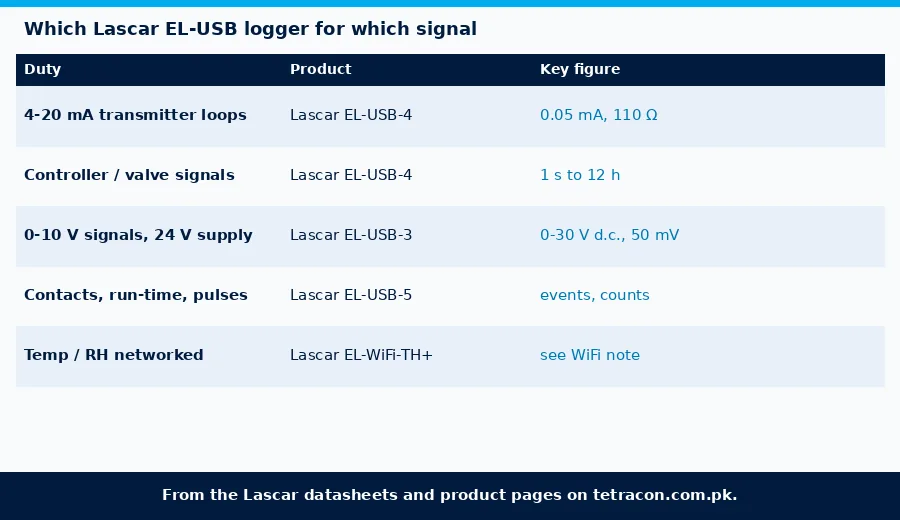
| 4-20 mA current loops | Lascar EL-USB-4 | 4-20 mA d.c.; 0.05 mA resolution; ±1 %; 110 Ω input; 32,510 readings; 1 s-12 h; 3-year battery |
| DC voltage signals and supplies | Lascar EL-USB-3 | 0-30 V d.c.; 50 mV resolution; ±1 %; 32,510 readings; 1 s-12 h; 3-year battery |
| Events, state changes and counts | Lascar EL-USB-5 | 3-28 V d.c. input or volt-free contacts; up to 4 events/s or 2 state changes/s; up to 100 counts/s; 32,510 readings; up to 1-year battery |
As a rule of thumb, choose the EL-USB-4 for transmitter and controller signals that are already 4-20 mA, the EL-USB-3 for 0-10 V signals or for checking a 24 V d.c. supply that may be sagging, and the EL-USB-5 for pump or valve run-time, door or relay contacts and pulse counts. For permanent networked monitoring of temperature and humidity, see our notes on the Lascar EL-WiFi-TH+ and the EL-SGD 70-ATP panel logger (general).
What to send with an enquiry
- The signals you want to log (4-20 mA, DC voltage, contacts or pulses), so we can confirm the EL-USB-4, EL-USB-3 or EL-USB-5.
- The loop details: 2-wire or 3-wire transmitter, loop supply voltage and the existing load, so the 110 Ω logger input can be checked against the budget.
- Where the logger will sit (control room, marshalling panel, field kiosk) and the area classification.
- How long you need to log and how fast the events are, to set the logging rate.
- How many loops you want to monitor at the same time, and whether spare batteries and range caps are needed.
- Whether you also need the transmitters themselves, for example Michell dew-point or moisture transmitters with 4-20 mA outputs.
FAQ
What does the EL-USB-4 measure?
It measures and records d.c. current over the 4-20 mA range, with an internal resolution of 0.05 mA and an overall error of ±1 %, storing up to 32,510 readings.
How do I connect it to a current loop?
The logger connects through two screw terminals on its 4-20 mA cap, with crocodile-clip leads supplied. It is placed in series with the loop; the datasheet shows wiring for a loop transmitter, a current-source sensor and a current-sink sensor.
Will it affect my loop?
Its input impedance is 110 Ω, which drops 2.2 V at 20 mA. Check that the loop supply and the transmitter's maximum load can take this extra voltage drop.
How fast can it log and for how long?
The logging rate can be set from once per second to once every 12 hours. The 32,510-reading memory lasts about 9 hours at 1 second or about 22 days at 1 minute, and the battery lasts 3 years at 25 °C and a 2 second logging rate.
Does it need special software?
No purchase is needed. Lascar's EasyLog USB software is a free download for Windows 7, 8 and 10 and is used to set up the logger, then graph, annotate and export the data to Excel, PDF or jpeg.
Can it be used in hazardous areas?
The datasheet lists no hazardous-area certification, so use it only in safe areas, for example at the control-room or marshalling-panel end of a loop.
Next steps
Tetracon (Pvt.) Ltd. is the sole authorized agent for Lascar Electronics in Pakistan and supplies its EasyLog data loggers with local technical support. Send us your signals, loop details, logging period and installation location, and we will confirm whether the EL-USB-4 or another logger is the right fit. Use the contact page or see our services. Start with the EL-USB-4, compare the EL-USB-3 and EL-USB-5, browse process instrumentation and dew point and moisture transmitters, or see all Lascar Electronics and Michell Instruments products and the full product catalogue. Related notes: online dew-point monitoring with the Easidew, the SF52 dryer dew-point transmitter and carbon monoxide data logging. Free technical guides are collected under Guides.