

Medicines, food ingredients, packaging, electronics, seed, paper and archived records all have a temperature and humidity range they are meant to be kept in, and in Pakistan the weather works against that range for much of the year: hot summers, a humid monsoon, cold nights in the north and power cuts that stop air conditioning and dehumidifiers without warning. A thermometer on the wall that someone reads twice a day misses most of what happens in a store, and a USB logger only tells you about an excursion after somebody downloads it, often days later.
This note looks at the Lascar EL-WiFi-TH+ WiFi temperature and humidity sensor from Lascar Electronics, a battery-powered data logger that streams its readings over an ordinary WiFi network to the EasyLog Cloud or a PC, and at how to use it in Pakistani warehouses, stores, server rooms and laboratories. Figures come from the EL-WiFi-TH+ datasheet (Issue 8, 03/2019, the copy hosted on our product page) and the current Tetracon product pages. Where we do our own arithmetic it is labelled. No prices are given; quantities, accessories and calibration certificates should be confirmed at quotation.
Why continuous temperature and humidity monitoring matters in Pakistani stores
- Summer heat. A warehouse with a metal roof, or a store room whose air conditioning trips during load shedding, can climb well above the storage limit on a product label within an afternoon. Continuous logging shows how often, how high and for how long.
- Monsoon humidity. Cartons, labels, paper, powders and electronic assemblies are often more sensitive to sustained high humidity than to temperature. Relative humidity is worth logging alongside temperature, not instead of it.
- Night-time and weekend excursions. Most problems happen when nobody is on site. A logger that sends alarms (email and SMS through the EasyLog Cloud, according to our product page) turns a discovered excursion into a phone call while there is still time to act.
- Records for audits and customers. Quality systems, customer audits and insurance claims all ask for the same thing: a continuous record, with dates and times, that shows conditions stayed inside the agreed range. Your own quality system or the product label sets the limits; the logger supplies the evidence.
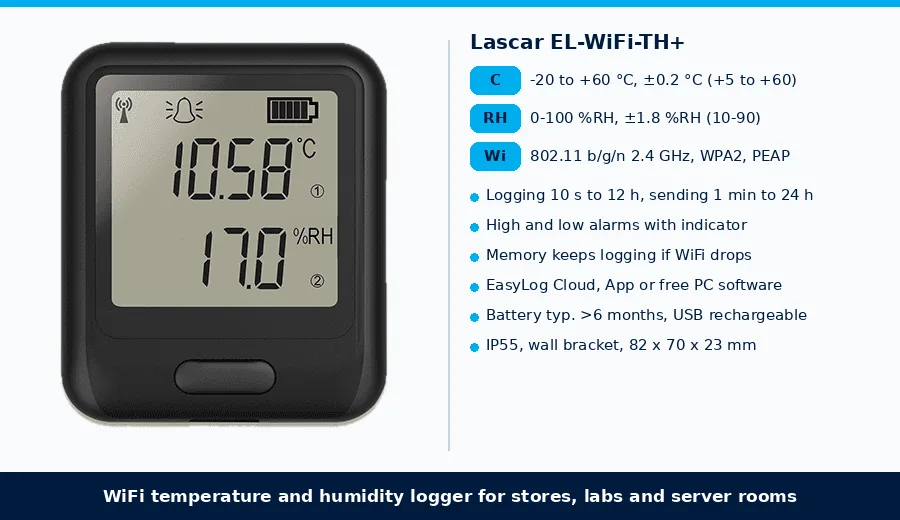
Lascar EL-WiFi-TH+ at a glance
| Item | EL-WiFi-TH+ datasheet |
|---|---|
| Type | High accuracy WiFi temperature and humidity sensor (data logger) with built-in display |
| Measurement range | -20 to +60 °C (-4 to +140 °F); 0 to 100 %RH |
| Temperature | Tolerance ±0.2 °C from +5 to +60 °C; resolution 0.01 °C (see the datasheet charts for detail) |
| Humidity | Tolerance ±1.8 %RH from 10 to 90 %RH at 25 °C; resolution 0.1 %RH (see the datasheet charts for detail) |
| Logging period | User configurable, 10 seconds to 12 hours (typical 10 minutes) |
| Transmission period | User configurable, 1 minute to 24 hours (typical 1 hour) |
| If WiFi drops | Keeps logging in sensor memory until it can communicate again (max 30 days at 10 second sample interval) |
| WiFi | IEEE 802.11 b/g/n, 2.4 GHz; WEP, WPA/WPA2 and enterprise networks (PEAP, TTLS, FAST) |
| Software | EasyLog Cloud and App, or free EasyLog WiFi PC software (Windows 7, 8.1, 10); view and graph multiple sensors and historic data |
| Alarms | Configurable high and low alarms with indicator; optional EL-WiFi-Alert audible and visual alarm |
| Power | Rechargeable internal battery, typical life over 6 months; USB supply 4.5-5.5 V; can be permanently USB powered |
| Protection | IP55 (bung fully inserted, not permanently powered, mounted vertically) |
| Mounting, size | Freestanding or in the supplied clip-in wall bracket; 82 x 70 x 23 mm excluding bracket |
| In the box | Wall mounting bracket; USB Type A to Micro B cable |
How the EL-WiFi-TH+ works on a site network
The sensor measures the temperature and humidity of the space it sits in and sends its readings over any compatible WiFi network. To put it on a network you either connect it by USB to a PC running the EasyLog WiFi software, or configure it wirelessly from the EasyLog Cloud app on a phone that has access to the network. After that it can be placed anywhere within range.
- Two separate timers. The logging period (10 seconds to 12 hours) sets how often a reading is taken; the transmission period (1 minute to 24 hours) sets how often the stored readings are sent. As our own arithmetic: at the typical settings, a reading every 10 minutes is 144 readings a day, sent in 24 hourly uploads.
- Cloud or local PC. The EasyLog Cloud gives access to every sensor from any internet-connected device. According to our product page you can change logger settings remotely, receive alarm notifications, link sensors from several sites into one account and give different users different privileges. Sites that prefer to keep data on their own network can store it on a PC instead.
- Corporate WiFi. Support for WPA/WPA2 and enterprise authentication (PEAP, TTLS, FAST) matters in pharmaceutical plants, banks and offices where the IT department will not allow an open or shared-key network. Note it is a 2.4 GHz device, so the access point must offer 2.4 GHz.
- Dew point. Our product page describes the EL-WiFi-TH+ as a temperature, humidity and dew point logger, which helps where condensation on cold surfaces is the real concern.
Power cuts, router outages and battery life
Load shedding usually takes the WiFi router down along with the air conditioning. The EL-WiFi-TH+ is battery powered, and if it loses its network connection it keeps logging in its own memory and sends the stored readings when the connection returns (the datasheet gives a maximum of 30 days at a 10 second sample interval). So the record of what the store did during the outage is not lost; it simply arrives later. Put the router and access point on a UPS if you want alarms to reach you during the outage, not after it.
The datasheet gives a typical battery life of more than 6 months, and lists what shortens it: the transmission period, the WiFi encryption method and how often the router rotates keys, signal strength, other WiFi traffic, sample rate and operating temperature. In practice, a weak signal at the far end of a warehouse and a one-minute transmission period will both cost battery. The battery recharges by USB (unit between 0 and 40 °C) from a PC, a USB wall adapter or a USB power bank, and the logger can also run permanently from a USB adapter. The datasheet notes readings may be affected while the battery is charging, so charge it away from the measuring point or allow it to settle.
Where to put the sensors
- Map first, then monitor. Hot and humid spots are rarely where the thermometer hangs. Place several loggers for a few weeks of summer and monsoon (high racks under the roof, near dock doors, outside walls, beside and away from AC outlets) and then fix permanent monitoring points at the worst-case locations.
- Humidity follows temperature. The datasheet points out that at around 90 %RH a 1 °C change in temperature can change relative humidity by up to 5 %RH. Keep sensors out of direct sun, away from AC discharge air and lights, and compare loggers only at the same temperature.
- Allow settling time. The humidity sensor takes about 20 minutes to reach 90% of a change in ambient conditions; after moving a logger into a new room, or when checking it against a reference, the datasheet advises up to four hours to settle.
- Keep chemicals away. Solvents and other volatile organic compounds can contaminate the humidity element. Do not mount loggers next to solvent stores, cleaning chemicals or strong-smelling materials; the datasheet gives a bake and re-hydration procedure to recondition a sensor after exposure, and high pollutant levels can damage it permanently.
- Mounting and enclosure. The IP55 rating applies with the bung fully inserted, the unit not permanently powered and mounted vertically, so use the supplied wall bracket the right way up. The operating range is -20 to +60 °C, which covers roof-level heat in a summer warehouse; for freezers below -20 °C, use a probe logger instead.
- WiFi coverage. Check signal strength at each point before fixing the bracket; steel racking and stacked metal stock shield radio signals.
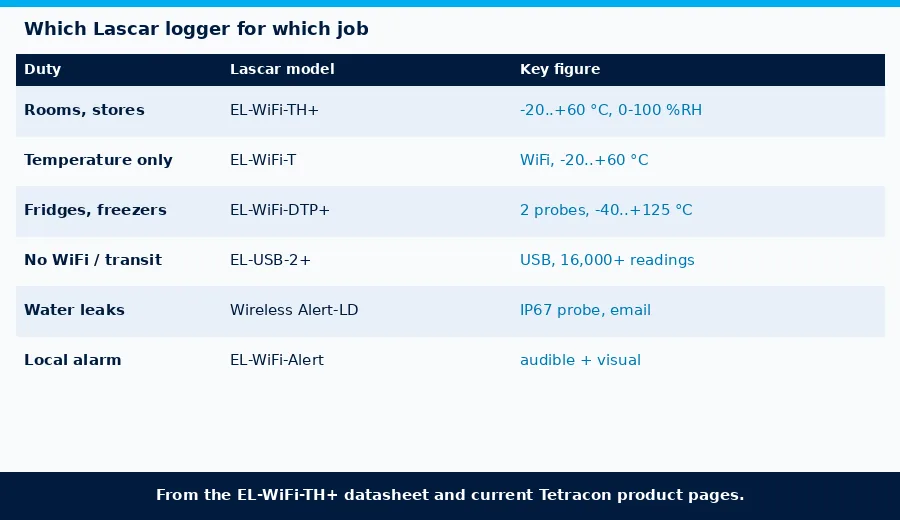
Choosing between Lascar loggers
| Duty | Lascar model | Why (datasheet / product page) |
|---|---|---|
| Warehouse, store, server room, lab: temperature and humidity with alarms | EL-WiFi-TH+ | -20 to +60 °C, 0 to 100 %RH, ±0.2 °C and ±1.8 %RH, WiFi to EasyLog Cloud |
| Temperature only, same WiFi system | EL-WiFi-T | WiFi temperature logger, -20 to +60 °C, high and low alarms |
| Fridges, cold rooms, freezers, or two points at once | EL-WiFi-DTP+ | Dual-channel WiFi logger with two thermistor probes, -40 to +125 °C out of the box |
| No WiFi available, or transit and spot surveys | EL-USB-2+ | Standalone USB temperature and RH logger, -35 to +80 °C, over 16,000 readings |
| Water on the floor of a store or server room | Wireless Alert-LD | Wi-Fi water leak sensor with an IP67 probe and email alert |
Calibration and records
Lascar offers a traceable calibration certificate service using reference equipment calibrated by a UKAS/NIST accredited laboratory, so ask for certificates at the time of order if your quality system or a customer audit requires them. Plan a recalibration interval in your own procedure, and when you check a logger in the field, compare it with a reference at the same temperature and give it time to settle, as above. Where the same site also needs humidity probes calibrated, see our note on humidity probe calibration with Rotronic HygroGen2 and HygroCal.
What to send with an enquiry
- Number of rooms or zones, their size and what is stored there
- Temperature and humidity limits from your product labels or quality system
- Whether any point is a fridge, cold room or freezer (probe loggers instead of room sensors)
- WiFi details: 2.4 GHz available, security type (WPA2 personal or enterprise), coverage in the storage area
- Where the data should go: EasyLog Cloud with email/SMS alarms, or a local PC
- Whether you need traceable calibration certificates, a local audible alarm or water leak detection as well
FAQ
What does the Lascar EL-WiFi-TH+ measure?
Air temperature from -20 to +60 °C and relative humidity from 0 to 100 %RH, with a tolerance of ±0.2 °C (from +5 to +60 °C) and ±1.8 %RH (10 to 90 %RH at 25 °C), and resolutions of 0.01 °C and 0.1 %RH.
What happens to the data during a power cut or WiFi outage?
The logger runs on its internal battery and keeps recording in its own memory while the network is down, then sends the stored readings when it reconnects. The datasheet gives a maximum of 30 days at a 10 second sample interval.
Does it work on a corporate WiFi network?
Yes, if the network offers 2.4 GHz. The sensor is IEEE 802.11 b/g/n compliant and supports WEP, WPA/WPA2 and enterprise networks using PEAP, TTLS or FAST.
How long does the battery last?
Typically more than 6 months, depending on the transmission period, encryption settings, signal strength, WiFi traffic, sample rate and temperature. It recharges by USB and can also be powered permanently from a USB adapter.
Can it send alarms?
It has configurable high and low alarms with an indicator on the unit. Through the EasyLog Cloud, alarm notifications can be sent by email and SMS, and the optional EL-WiFi-Alert adds a local audible and visual alarm.
Can it monitor a freezer or vaccine fridge?
Not as a room sensor in a freezer below -20 °C. For fridges, cold rooms and freezers use a probe logger such as the EL-WiFi-DTP+, and see our vaccine cold-chain note for the glycol-probe kits.
Next steps
Tetracon supplies Lascar Electronics data loggers across Pakistan, including the EL-WiFi range, EL-USB standalone loggers and the Wireless Alert-LD leak sensor. Send us a plan of the store or the list of rooms and their limits, and we will help choose the loggers, positions, alarm set-up and calibration certificates. Use the contact page or see our services. Start with the Lascar EL-WiFi-TH+, compare the EL-WiFi-T, EL-WiFi-DTP+ and EL-USB-2+, add a Wireless Alert-LD where water is a risk, browse environmental monitoring, or see all Lascar Electronics products and the full product catalogue. Related notes: humidity and temperature monitoring for pharma cleanrooms and storage, vaccine and pharma cold-chain temperature monitoring and carbon monoxide data logging with Lascar EL-USB-CO. Free technical guides are collected under Guides.